Phonetic Dictionaries
Phonetic dictionaries help with the pronunciation of words. Each entry in a phonetic dictionary can include:
- Common Pronunciation – a plain-text description using regular letters, for example
"tomayto". - IPA – International Phonetic Alphabet notation, for example
/təˈmeɪtoʊ/.
A phonetic dictionary lets you build up a list of words together with their pronunciation information, so unfamiliar or unusual words are pronounced correctly.
This guide covers how to create, view, edit, search, and delete phonetic dictionaries, as well as how to add and manage the word entries within them.
Creating a Phonetic Dictionary
Selecting the option to create a new phonetic dictionary opens the Create New Phonetic Dictionary window.
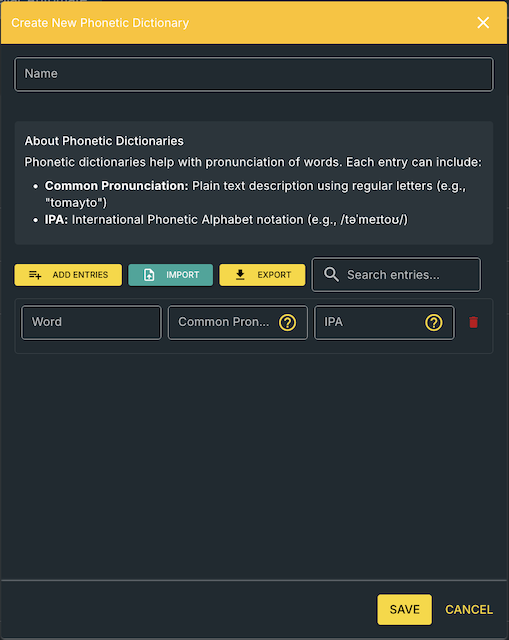
To create a dictionary:
- Open the Create New Phonetic Dictionary window.
- Enter a name for the dictionary in the Name field.
- Select ADD ENTRIES to add words using the Add Words interface (see Adding words section below).
- Complete the Common Pronunciation and/or IPA for each word as needed.
- Select SAVE to save the new dictionary, or CANCEL to close the window without saving.
Adding Words and Pronunciation Entries
Selecting ADD ENTRIES opens the Add Words dialog, which lets you add multiple words to the dictionary at once rather than one at a time. The dialog includes:
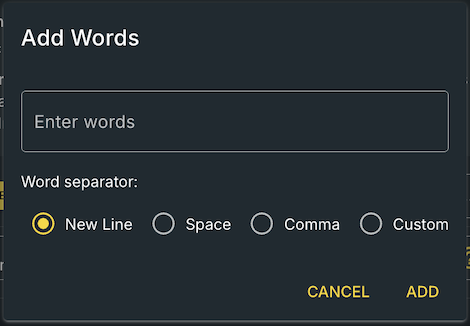
- An Enter words field.
- A Word separator setting, with the following options:
- New Line – each word is entered on its own line.
- Space – words are separated by spaces.
- Comma – words are separated by commas.
- Custom – lets you specify your own separator.
- CANCEL and ADD buttons.
To add words:
- Select **ADD ENTRIES **button.
- Enter your words into the Enter words field.
- Choose the Word separator that matches how you've entered the words.
- Select ADD to add them to the dictionary, or CANCEL to close the dialog without adding them.
- Once added, complete the Common Pronunciation and/or IPA fields for each new word.
Dictionary Entry Fields
Each entry in a phonetic dictionary has three fields:
Word
The word that the pronunciation information applies to.
Common Pronunciation
A plain-text pronunciation guide written using regular letters, for example tomayto. This gives an easy-to-read pronunciation without requiring knowledge of phonetic notation. A help icon next to the field provides guidance on how to fill it in.
IPA
The pronunciation written using the International Phonetic Alphabet, for example /təˈmeɪtoʊ/. IPA provides a standard, precise way to represent how a word should sound. A help icon next to the field provides guidance on how to fill it in.
Viewing a Phonetic Dictionary
Selecting the View action for a dictionary opens the View Phonetic Dictionary window, which shows:
- The dictionary Name.
- Created and Last Modified details, including the date, time, and the user who last modified the dictionary.
- An EXPORT button, for exporting the dictionary as a JSON or a CSV file.
- A Search entries field, for finding specific words within the dictionary.
- The full list of entries, showing each Word along with its Common Pronunciation and IPA.
- SAVE and CANCEL buttons.
Editing a Phonetic Dictionary
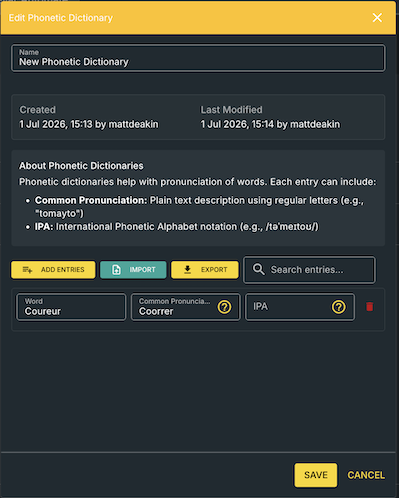
From this window you can:
- Update the dictionary Name if required.
- Select ADD ENTRIES to add further words using the Add Words interface.
- Select IMPORT to import entries into the dictionary.
- Select EXPORT to export the dictionary.
- Use Search entries to locate a specific word.
- Edit the Common Pronunciation and IPA fields directly for any entry.
- Select the bin icon next to an entry to remove it from the dictionary.
- Select SAVE to save your changes, or CANCEL to close the window without saving.
Searching Dictionary Entries
You can search for a specific word using the Search entries... field, available in the View Phonetic Dictionary and Edit Phonetic Dictionary windows.
- Open the relevant phonetic dictionary.
- Enter a word or search text into Search entries.
- Review the matching entries displayed in the list.
Importing and Exporting Entries
IMPORT and EXPORT are available from the Create New Phonetic Dictionary and **Edit Phonetic Dictionary **windows, with EXPORT also available when viewing a dictionary. The file formats supported for import and export are JSON and CSV.
Removing an Entry
Each entry in the Create New Phonetic Dictionary and Edit Phonetic Dictionary windows has a bin icon. Selecting this icon removes that entry from the dictionary.
Creating Folders
Phonetic dictionaries can be organised into folders, making larger collections of dictionaries easier to manage and locate.
Phonetic Dictionary Actions Overview
| Action | Purpose |
|---|---|
| Create New Phonetic Dictionary | Start a new phonetic dictionary |
| Name | Set the dictionary's name |
| View | Open and review a dictionary |
| Edit | Open a dictionary to modify its entries |
| Delete | Remove a dictionary or an individual entry |
| ADD ENTRIES | Add new words to a dictionary via the Add Words dialog |
| Common Pronunciation | Plain-text pronunciation for a word |
| IPA | International Phonetic Alphabet pronunciation for a word |
| IMPORT | Import entries into a dictionary |
| EXPORT | Export a dictionary's entries |
| Search entries | Find a specific word within a dictionary |