Working with ESEF Files
About ESEF
ESF files have been used for approximately 20 years for Audio Description (AD) in the UK. The format is based on the proposed 1998 ETSI standard, “Digital Video Broadcast Subtitle File Transfer Format,” although Audio Description is the main area where the format has been adopted.
ESF is used by both ADept (Softel) and ADvantage (Starfish), but it is effectively a proprietary format with some limitations.
Stellar supports ESF files natively, but there are several limitations:
- Comments – Comments can only be stored as part of the text; however, text enclosed in
{}brackets is interpreted as a comment by Stellar. - Audio Takes – Only a single audio take is supported per title.
- Trimming and Gain – ESF files cannot store audio trimming values or audio gain settings.
- Audio Start Time – ESF audio cannot start before the beginning of a title.
- Frame Rate – ESF files contain a frame-rate value, but **ADept (Softel) does not support 23.976.
Overview of Limitations
When working with ESF in Stellar (v5.0 or later), you will see multiple takes if you create them, and you can trim takes and apply gain. However, any take which has trim values or gain will show in red, indicating that the version of that audio in the ESF file itself is unconformed, in other words, incompatible with the ESF format.

To ensure that the ESF reflects what you see and hear in Stellar, you must ‘Conform’ the audio - this can be done via a right click on the title, or on the take itself. Once the audio has been conformed, the take will turn blue on the timeline, an indication that the ESF file and audio file will correctly reflect what you see and hear in Stellar.

If you re-load the Task (causing the ESF file to be loaded fresh), you will see that only a single Take per title, and any unconformed takes will have lost their trim/gain values.
ESF Conforming
Important: Conforming is the process of making the audio take(s) associated with a text box ESF-compliant by applying the required trim and gain values and, where applicable, mixing existing takes.
1. One Audio Take Under the Subtitle Text Box:
Unconformed
The original audio take is present under the subtitle text box.


Conformed


- The original audio take is muted.
- A new take is created by adding silence to the audio until it matches the size of the text box.
- The required trim and gain values are applied to the new take.
After Reload

After the Task is reloaded, only the ESF-compliant take is retained.
2. Two Audio Takes Under the Subtitle Text Box
Unconformed
Two alternative audio takes are available under the subtitle text box.

Conformed
The audio takes are conformed to the text box and the required trim and gain values are applied.
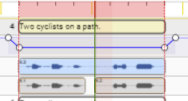
After Reload

The alternative takes are available just until the Task is Reloaded.
ESEF files do not support alternative takes! Please keep that in mind when working with ESF FILES.
These takes cannot be recovered!
Conversion
When converting to **ESEF **from another AD format (TTAL or srtad), the following Audio options are available:
- None – Does not copy the referenced audio files and removes the references to those files.
- All Takes – Copies all audio files referenced by the input file.
- Mix & Trim Takes – Mixes and trims the active audio takes during the duplication process.
- Advantage Compatible – Checks the converted Task for compatibility with ADvantage before duplication.
None
Only the titles are copied to the new ESEF file. No referenced audio files are copied.
| Option | - | Description |
|---|---|---|
| STRAD | - | The original STRAD file used for conversion. |
| ESEF | - | The resulting ESEF file containing only the copied titles. |
All Takes
Only the titles are being copied to the next file.
| Option | - | Description |
|---|---|---|
| STRAD | - | The original STRAD file used for conversion. |
| ESEF | - | The resulting ESEF file containing the copied titles and all referenced audio takes. |
Mix & Trim Takes
The active audio takes are mixed and trimmed during the duplication process before being included in the ESEF file.
| Option | - | Description |
|---|---|---|
| STRAD | - | The original STRAD file used for conversion. |
| ESEF | - | The resulting ESEF file containing the titles with the active audio takes mixed and trimmed. |