Casting Contol Page
Casting controls
Casting is the process of selecting either human voice artists or specific synthetic voices for each role in a dubbing file or for the single narrator in an audio description file.
The casting settings are stored as part of a task for a specific audio description or dubbing file.
To open the casting dialog click on the casting control button either in the media control bar or at the top of the synthetic voice widget. 
This will open the casting tab in the file status dialog.
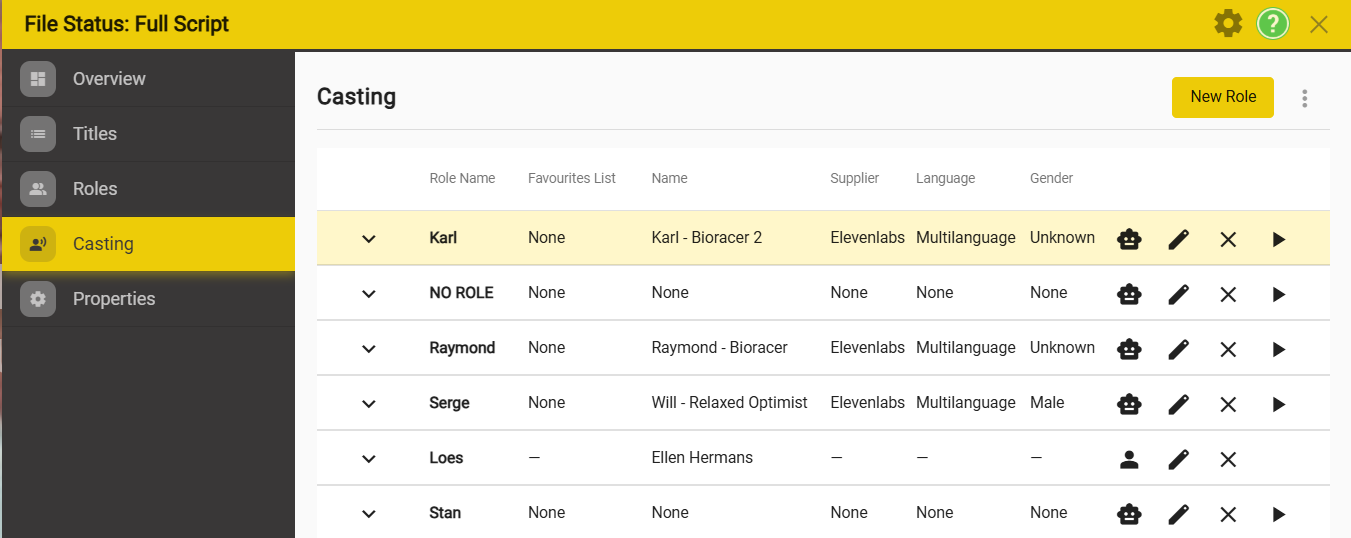
The Casting tab lists all the roles in the currently selected dubbing script.
**Controls **
Down arrow. - Show more details about the selected voice, including settings, styles, etc. You can edit the changes and save them here.
There will be different settings depending on the voice supplier selected.
Robot/human head - Select between casting a synthetic voice and a human voice talent.
Pencil icon - edit the voice selection.
- For synthetic voice selection see ### Link to synthetic voice page, voice selection section
- For human voices you can select using the Filter dialogue
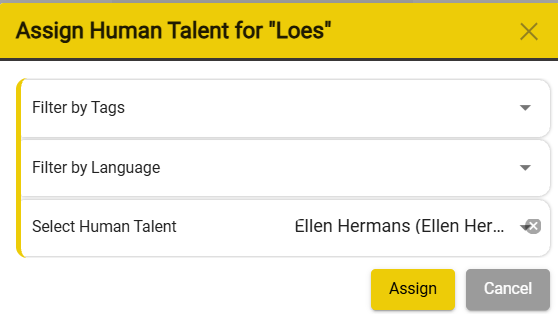
- You can use the tag and language filters to reduce the size of the list of talenta
- Select the voice talent and click Assign.
X Button - Delete the current voice selection.
Play button - hear the selected voice speaking the first lines assigned to that voice in the current file.
- Synthetic voices only.
New role button
- You can add a new role to the current file with the New Role button.
- Add the role. The name must be unique.